CYBER CITY DRIVER
CYBER CITY DRIVER — Game Controls:
Player 1 ### Move: ARROW KEYS ### Nitro: N ### Look Back: B Player 2 ### Move: W,A,S,D ### Nitro: T ### Look Back: C ### Level Restart: R
CYBER CITY DRIVER — Review + Tips & Tricks:
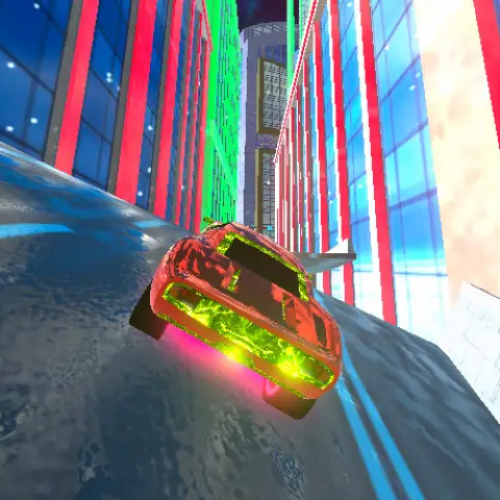
Late-night racing just feels different when the roads glow. The city lights reflect off the pavement, traffic is almost nonexistent, and the engine sound echoes between skyscrapers. That’s exactly the mood you get in Cyber City Driver, a futuristic driving game where the streets look like they came straight out of a sci-fi movie and every straightaway begs for a burst of nitro.
Instead of locking you into a single race format, the game gives you room to explore and experiment. One moment you’re casually cruising through wide neon boulevards in Free Drive, learning how your car handles at high speed. The next, you’re chasing the clock in Time Trial mode where every corner and acceleration point matters. Completing challenges earns credits that you can spend upgrading your vehicle—something you’ll quickly realize is essential once the speed starts climbing.
The handling feels responsive in a satisfying way. Steering too sharply at full speed will send you sliding, but a controlled drift combined with a quick nitro boost can launch you perfectly into the next straight. It creates those small “perfect moment” runs where every turn lines up and you feel completely in control of the car.
Controls
Use WASD or Arrow Keys to drive, Shift to activate nitro for extra speed, Space for a quick handbrake drift, and C to change camera views depending on how you like to race. If you ever crash or get stuck, R resets the car instantly so you can keep going without losing momentum.
Tips & Tricks for Faster Runs
Learn the city layout. Spending a few minutes in Free Drive helps you remember sharp corners and hidden shortcuts that can shave seconds off your time in races.
Don’t waste nitro in turns. Save your boost for long straights where you can fully control the car. Using it mid-corner often sends you sliding into barriers.
Upgrade acceleration first. Quick takeoffs help you recover after braking or small crashes, which is far more useful early on than just having a higher top speed.
Use short drifts, not long slides. A quick tap of the handbrake can help rotate the car through tight turns without losing too much speed.
Experiment with camera views. Some players prefer the hood camera for precision, while others race better with the wider third-person view.
One thing that stands out while playing on Classroom Events G is how the city itself becomes part of the challenge. Wide highways, tight intersections, and glowing overpasses create a playground where improving your driving line actually feels rewarding. Each run becomes a small test of skill: smoother cornering, better boost timing, and faster reactions.
If you enjoy fast-paced driving challenges, you can also try Neon Racer for another futuristic speed experience, or test your reflexes in traffic with Highway Racer 3D here on Unblocked Games G+.
Final thoughts: the glowing skyline, responsive controls, and variety of driving modes make this game perfect for players who enjoy improving their racing skills one run at a time. Once you start chasing smoother laps and faster boosts, it’s surprisingly hard to stop.
CYBER CITY DRIVER — Gameplay
Gameplay, quick guides, and reviews recorded for ClassroomEventsG.com